Procurement Documents 101 - Dictionary of the Source-to-Pay cycle

David Peleg
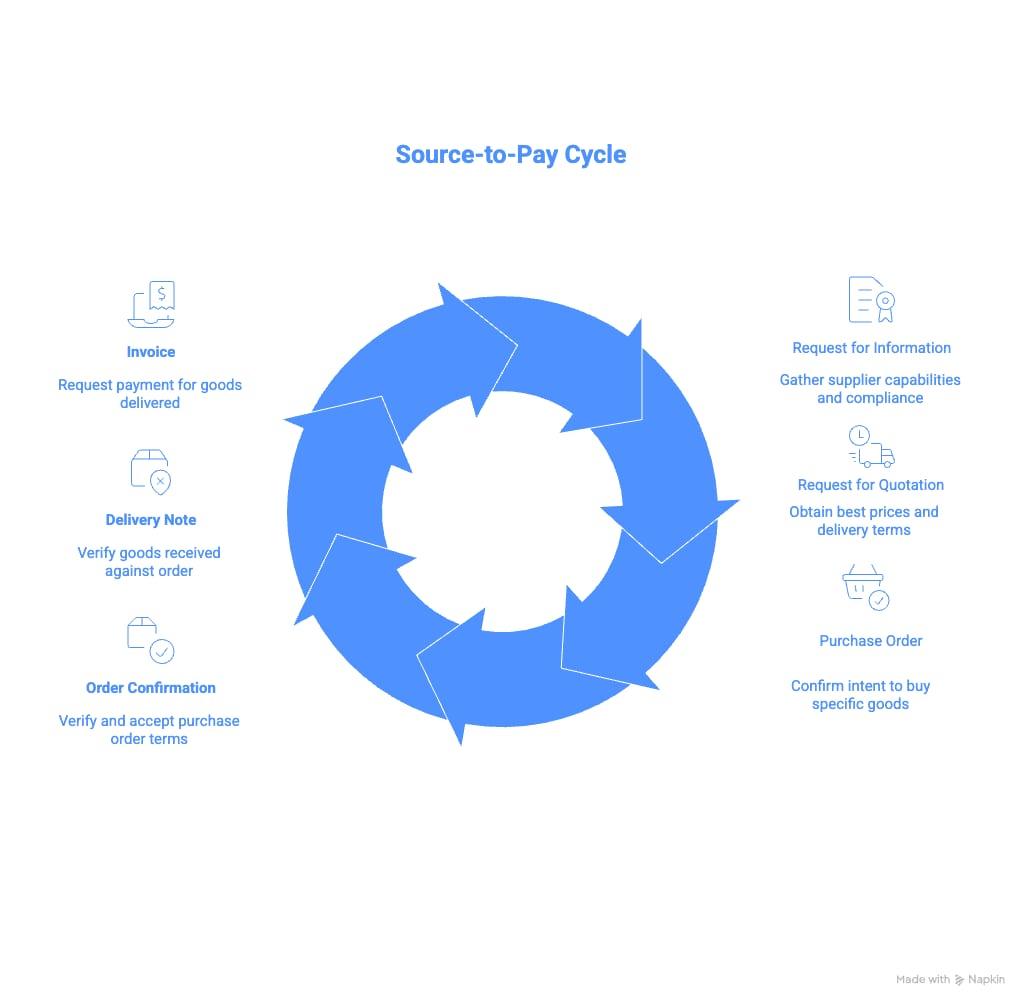
Dictionary for the Source-to-Pay Cycle
Navigating the procurement lifecycle can feel like learning a new language. Every stage from sourcing to payment has its own specific documentation, data requirements, and—most importantly—its own set of headaches when things don't match up.
Organizations often rely on standard AI, OCR, and purchase requisition software to digitize their paperwork. These general-purpose models often fall short when faced with the specific, nuanced requirements of the manufacturing procurement lifecycle.
At Evolinq, we build AI agents that automate the entire supply chain, so we’ve seen firsthand how messy this coordination data can get. We’ve compiled this dictionary to help you understand the core documents in the cycle, the data they contain, and the specific challenges that arise when analyzing them.
Request for Information (RFI)
- Purpose and when to use: Used at the very beginning of the sourcing process to gather general information about suppliers' capabilities, financial stability, and experience. Most often, its used for scoping out countries of sourcing, Minimum Order Quantity (MOQ), Minimum Product Quantity (MPQ), and Lead Time. Additionally, it is used for scoping limitations, ensuring vendors meet specific regulatory compliance (e.g., GDPR, FDA) and business compliance standards before pricing is even discussed.
- Common input columns: Supplier Name, Capabilities Description, Certifications (ISO, etc.), sourcing country, MPQ, Lead Time, Compliance Status.
- Response: attachments (links to certificates, financial reports, etc…), compliance status, general comments and exceptions (for example, notes on why a specific standard cannot be met)
- Challenges to look out for during analysis:
- Qualitative vs. Quantitative: Responses are often unstructured text, making it difficult to compare suppliers side-by-side programmatically.
- Unit Conversion: for example, stating MOQ as 100 packages of 10, requires conversion to 1000 units, or a lead time of 2 weeks vs 14 days.
- Ambiguous language: for example, specifying USA, US, or United States should all be parsed into the same country code.
- Vague Scope: If the RFI questions aren't specific, vendors may provide generic marketing material rather than useful operational data.
Request for Proposal (RFP)
- Purpose and when to use: Used when you have a specific problem or project but want suppliers to propose their own methodologies or solutions. It focuses on the how and value rather than just the price.
- Common input columns: Project Scope, Methodology, Implementation Timeline, Service Level Agreements (SLAs), Total Cost of Ownership (TCO) estimates.
- Response: Proposal document containing the solution, estimated resources, cost, and timeline
- Challenges to look out for during analysis:
- Inconsistent Formats: Vendors may submit proposals in completely different formats (PDFs, slides, Excel), making apple-to-apple comparison nearly impossible without manual normalization.
- Scope Creep: It can be difficult to ensure all vendors are bidding on the exact same scope if the RFP requirements were open-ended.
Request for Quotation (RFQ)
- Purpose and when to use: Used when you know exactly what you want (specs, quantities) and solely need the best price and delivery terms. This is a transactional document focused on "hard" numbers.
- Common input columns: Item Description, SKU, Quantity, Unit Price (with Currency), Total Price (with Currency), Incoterms (Shipping/Liability terms).
- Unique identifier of each row: Quantity + Product Name. (Unlike other documents, an RFQ line often lacks a simple line ID because vendors offer tiered pricing based on quantities or Delivery dates).
- Common Response columns: Line Item Number, Unit Price, Price Break / Tier: (e.g., "Price applicable for >100 units"), Lead Time, Minimum Order Quantity (MOQ), Substitute SKU (If the requested Part Number is obsolete/unavailable)
- Challenges to look out for during analysis:
- Tiered Pricing Complexity: You may see the same product name appearing on multiple different lines with different unit prices, depending on the volume break (e.g., purchasing 100 units vs. 1000 units, or supplying several parts of the order at different delivery dates).
- Missing Line IDs & String Matching: Because there is no standard ID to link a quote back to your internal requirement, you are often forced to match based on Product Name. This is risky: a single character difference (e.g., "Bolt-M5" vs "Bolt-M6") means the part is completely different, but a fuzzy match algorithm might mistakenly link them.
Purchase Order (PO)
- Purpose and when to use: The legally binding contract sent from the buyer to the supplier. It confirms the intent to buy specific goods at specific prices and terms.
- Common input columns: PO Number, Line/Item Product Number, SKU, Manufacturer Name and Code (for each line), Balance for Supply (in case of split orders by supplier), Quantity, Unit Price, Total Price, Required Supply Date.
- Unique identifier of each row: Line/Item Number.
- Challenges to look out for during analysis:
- Date vs. SKU Mismatches: You often encounter the same SKU listed on different lines with different delivery dates. If your analysis groups strictly by SKU, you will miss critical delivery schedule nuances.
- Price Matching: Ensuring the price on the PO matches the "actual" agreed price from the RFQ or contract is a frequent compliance failure point.
Order Confirmation (OC)
- Purpose and when to use: A document (or digital acknowledgement) from the vendor confirming they have received the PO and accepting the terms, or proposing changes.
- Common input columns: Line/Item Number, Part Number (both buyer P/N as well as the supplier P/N), Quantity Ordered, Quantity available, Backorder/Balance (to be fulfilled later), Delivery Date (often both requested date as well as confirmed date), Units of measure, Unit price, Discount, Total price (including currency).
- Unique identifier of each row: Line/Item Number.
- Challenges to look out for during analysis:
- The Critical Miscommunication Check: This is the single most critical step for compliance. You must check for Price Variances, SKU Mismatches, and Quantity Mismatches between the PO and the OC. In some scenarios we might even encounter items from a different PO in the current OC. If the vendor confirms a slightly different SKU or quantity than requested, and it goes unnoticed here, the error will propagate through the entire chain.
- Split/Combined Orders: Vendors often split a single PO line into multiple shipments based on current stock, or combine multiple POs into one shipment. This breaks 1-to-1 mapping and requires complex logic to track fulfillment.
Delivery Note (Packing Slip)
- Purpose and when to use: Accompanying the physical shipment, this lists exactly what is in the box. It is used by the receiving team to verify that the goods arrived.
- Common input columns: Tracking Number, SKU, Quantity, Description, Box/Pallet Count, Weight.
- Unique identifier: Tracking Number (often used as the primary ID for the shipment).
- Challenges to look out for during analysis:
- Tracking ID as Identifier: Using the tracking number as a unique identifier creates issues when an order is split (one tracking number covers partial goods) or consolidated (one tracking number covers multiple POs). In such scenarios, it's important to match the Quantity and UoM between the PO and Delivery Note.
- Matching Convention: Field conventions often differ here; ensuring the "Order Number" referenced on the Delivery Note matches your internal PO number format is a common struggle.
Invoice
- Purpose and when to use: The request for payment. It marks the end of the transactional cycle and must reconcile with the PO and the Goods Receipt. Note that there is a difference between Tax Invoices, which are used for local domestic transactions, and Commercial Invoices, which are used for international shipments for customs
- Common input columns: Invoice Number, Invoice Date, Line/Item Number, Description, Part number (both buyer P/N as well as the supplier P/N), Country of Origin, Delivery note, Quantity, Unit price, Total price, Tax, VAT, Currency, Payment Instructions, Reference PO Number.
- Unique identifier: Invoice Number.
- Challenges to look out for during analysis:
- Commercial vs. Tax Invoice: Distinguishing between a Commercial Invoice (used for customs/shipping) and a Tax Invoice (legal demand for payment) is critical to avoid duplicate payments or accounting errors.
- Mandatory Fields: The PO Number and Line Price must always be present to allow for "Three-Way Matching." If they are missing, the invoice is essentially unprocessable.
- Currency & Tax Compliance: Verifying that discounts are applied correctly before or after tax, and that the currency exchange rates match the PO date (or agreed terms), is a major compliance hurdle.
Taming the Documentation Chaos with Evolinq
As we've explored, every document in the source-to-pay cycle—from the initial RFI to the final Invoice—comes with its own set of data pitfalls that make reliable source to pay analytics hard to build. Whether it is normalizing unstructured text from an RFP, catching a subtle SKU mismatch in an Order Confirmation, or ensuring a Delivery Note matches a split PO, the manual analysis required is often overwhelming and prone to error.
This is where Evolinq comes in.
We created the Expeditor and Strategic Buyer Agents specifically for manufacturing companies to take the "heavy lifting" out of this coordination. Evolinq connects directly to your ERP system and autonomously handles the procurement lifecycle by analyzing the very documents we discussed above.
Instead of your team manually cross-referencing PDFs, spreadsheets, and emails to ensure compliance, Evolinq’s AI reads and validates the data for you. It automatically detects the price variances, delivery date conflicts, and quantity mismatches that typically slip through the cracks, allowing you to focus on strategy rather than data entry.
Ready to stop fighting with your procurement data? Let Evolinq handle the paperwork so you can handle the business.