What Happens When You Let AI Agents Run Your Entire PO Lifecycle — A Technical Walkthrough

Or Feldman
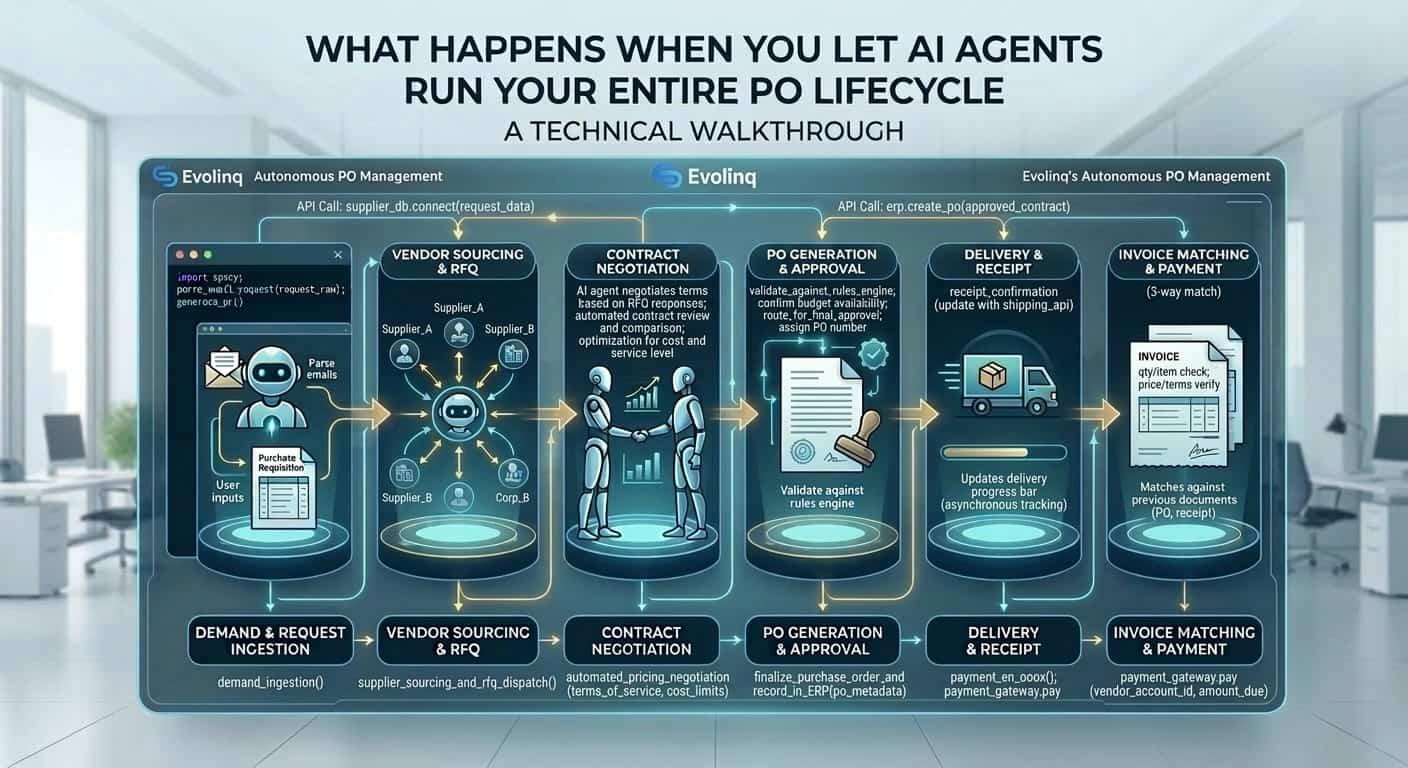
Most AI procurement vendors describe what their system does. Fewer explain how it does it.
This post is for the second audience: IT directors, digital transformation leads, and technically sophisticated procurement leaders who want to understand the actual architecture before they sign anything. We will walk through the complete technical lifecycle of a purchase order as handled by Evolinq's autonomous agents — from ERP read to goods receipt confirmation — explaining each processing layer, the data flows between them, and the design decisions that make autonomous execution safe at production scale.
No black boxes. No vague references to "machine learning." Just the system, end to end.
The PO Lifecycle Map
Before going layer by layer, it is useful to see the complete flow. Every purchase order that passes through Evolinq moves through seven stages:
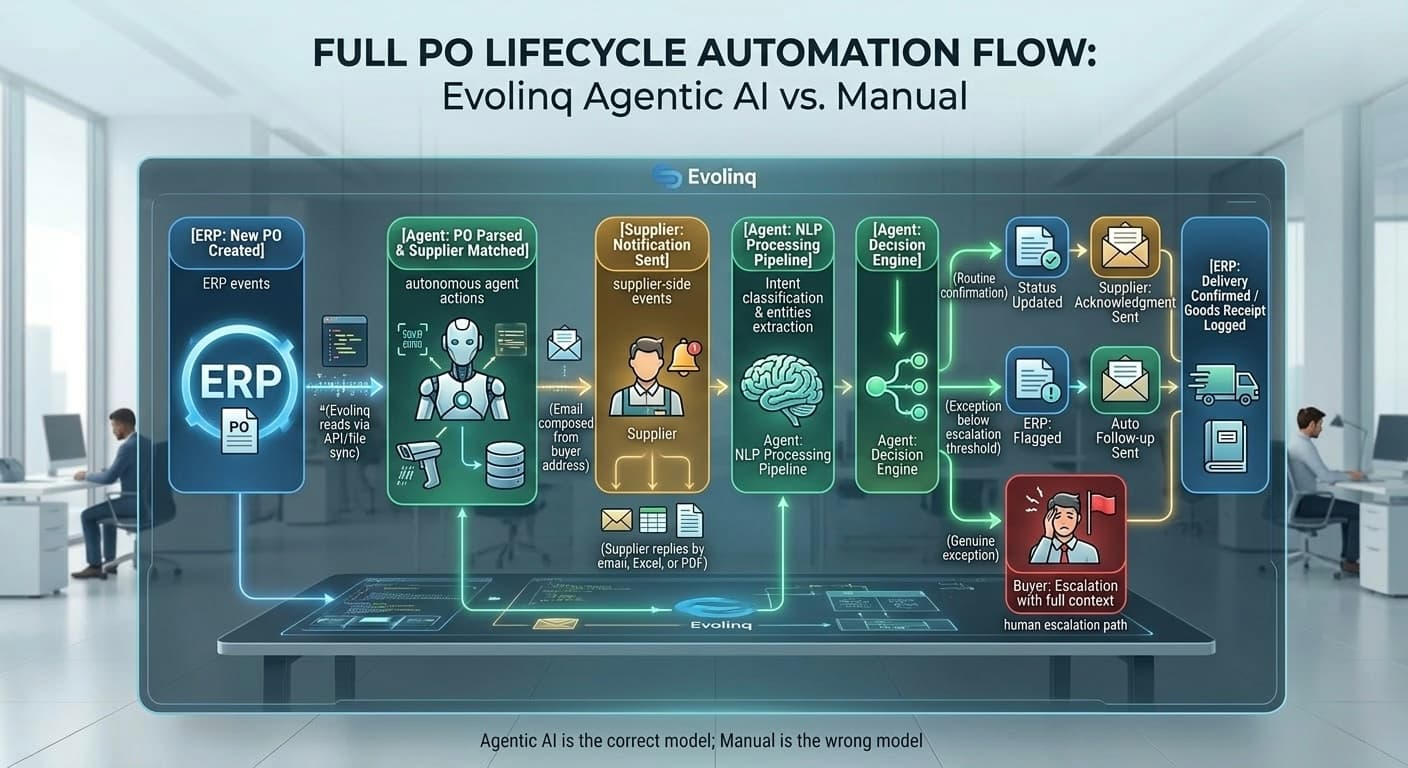 Full PO Lifecycle Automation Flow: from ERP trigger to supplier delivery confirmation, showing all autonomous and human escalation paths.
Seven stages. Five are fully autonomous. Two involve humans — and only when the situation genuinely warrants it.
Layer 1 — ERP Integration: Reading and Writing Without a Custom Project
The first question most IT directors ask is: "How long does ERP integration take, and what does it touch?"
The answer is days, not months — because Evolinq does not integrate at the application layer. It integrates at the data layer.
How the connection works
Evolinq supports three integration patterns, selected based on what the customer's ERP environment exposes:
-
REST API integration: For cloud ERPs (NetSuite, Infor CloudSuite), Evolinq uses the vendor's standard REST APIs to read and write data. No custom development on the customer's side. Configuration involves credentials, endpoint mapping, and field-level permissions — a process that takes hours, not weeks.
-
File-based sync: For on-premise or hybrid SAP environments, Evolinq can operate on scheduled file exports (CSV, XML, IDOC) dropped to a designated SFTP location. The agent picks up new files on a configurable polling interval, processes them, and writes results back to the drop location for the ERP to consume on its next import cycle.
-
Direct database read (read-only): In some environments, Evolinq is granted read-only access to specific ERP database views. This enables real-time PO status checks without requiring API availability.
In all three patterns, the integration is scoped. Evolinq requests minimum necessary permissions — read access to specific tables and objects, write access to specific fields. It does not require broad ERP admin access.
What Evolinq reads
For each active purchase order, the agent reads:
- PO header: PO number, organization, buyer, creation date, currency, payment terms
- PO lines: Item number, supplier part number, description, ordered quantity, unit of measure, unit price, requested delivery date
- Supplier master: Supplier ID, name, contact email addresses, active flag, preferred communication language
- Inventory snapshot (on configured sync): On-hand quantity, safety stock level, reorder point, warehouse location
- BOM reference (where available): Which parent assemblies depend on this item, production schedule dates that consume it
- Lead time data: Historical supplier lead time per item, standard lead time from supplier master
What Evolinq writes back
After processing supplier responses, the agent writes:
- Confirmed delivery date per PO line
- Confirmed quantity per PO line (may differ from ordered if partial)
- Supplier acknowledgment reference (supplier's own PO number or confirmation ID)
- Status flag:
confirmed,partial,delayed,disputed,pending - Exception notes: Free-text field populated when the agent escalates or flags an anomaly
- Goods receipt confirmation (when supplier sends delivery notification)
All write-back operations are logged with timestamp, agent action ID, and the source supplier communication that triggered the write. Every ERP update is auditable to the specific email or attachment that caused it.
Layer 2 — NLP on Supplier Communication: From Raw Email to Structured Data
This is the layer that makes the rest possible. If the agent cannot reliably read what a supplier sent, nothing downstream works correctly.
Supplier communication is not structured. A supplier in Romania might send a confirmation as a free-text email in English. A supplier in Taiwan might send an Excel file with columns in Chinese, confirmation status indicated by color coding, and dates in DD/MM/YYYY format. A supplier in Germany might send a PDF with a formal order acknowledgment form where delivery dates appear in a table that spans two pages.
Evolinq's NLP pipeline was built for this environment. Here is how it works.
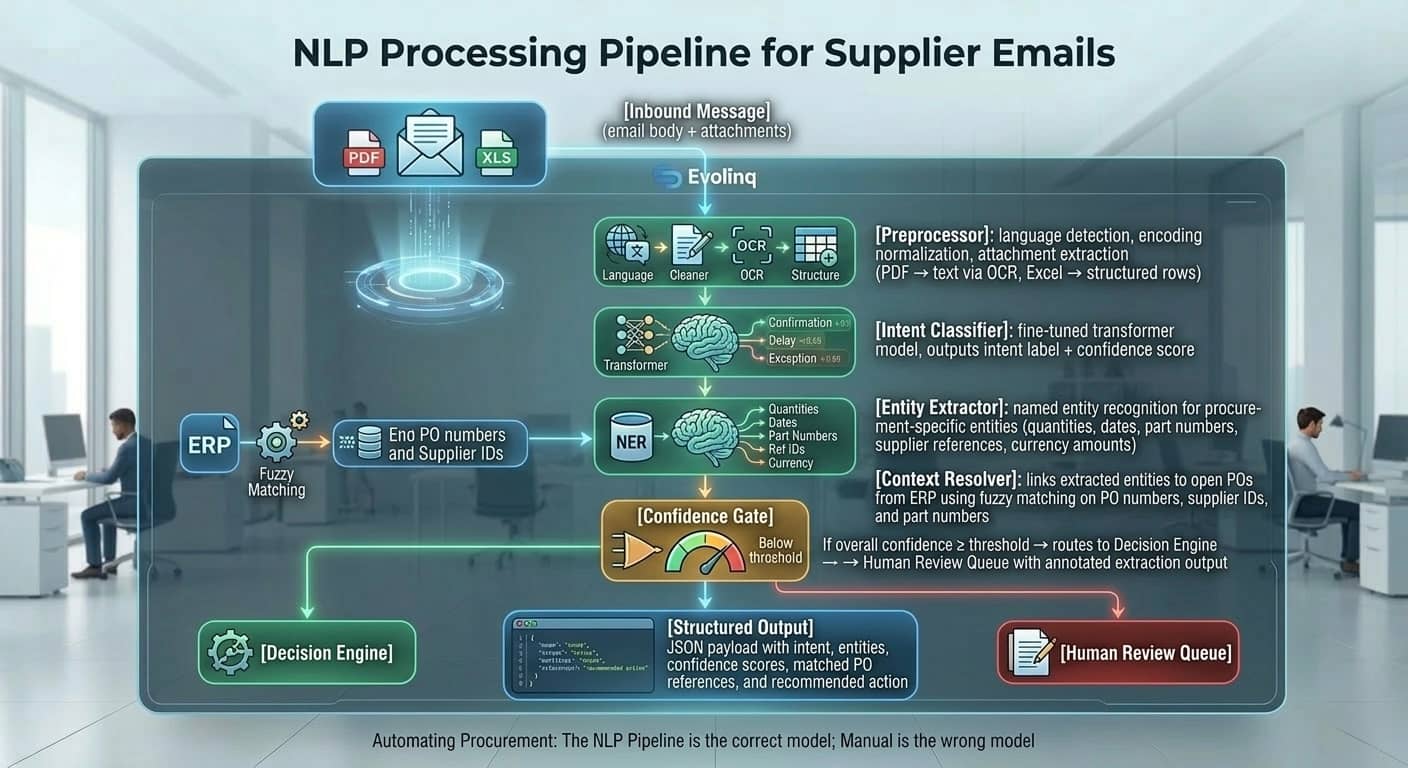 NLP Processing Pipeline: every inbound supplier message flows through preprocessing, intent classification, entity extraction, context resolution, and a confidence gate before reaching the Decision Engine.
Step 1: Preprocessing
Every inbound message goes through a preprocessing pipeline before any model sees it:
- Language detection and normalization (Evolinq processes supplier communication in English, Hebrew, Spanish, German, French, Japanese, and Chinese)
- Character encoding normalization (particularly relevant for suppliers in Asia and Eastern Europe where encoding errors are common)
- Attachment extraction: PDFs are converted to text using a combination of pdfminer for text-based PDFs and Tesseract OCR for scanned documents. Excel files are parsed to extract tabular data with column header identification.
- Deduplication: The pipeline checks whether this message has already been processed (by message ID) to prevent double-processing of forwarded or re-sent emails.
Step 2: Intent classification
A fine-tuned transformer model classifies each parsed communication into one of the following intent categories:
| Intent | Description | Example |
|---|---|---|
order_confirmation | Supplier confirms all lines as requested | "We confirm PO-4471 in full for 15-Apr delivery" |
partial_confirmation | Supplier confirms some lines, defers others | Excel with mixed confirmed/pending rows |
delivery_delay | Supplier advises later delivery than requested | "Due to component shortage, delivery pushed to 22-Apr" |
partial_shipment | Supplier ships partial quantity | "Shipping 600 of 1,000 units this week, remainder in 3 weeks" |
pricing_dispute | Supplier flags discrepancy with contracted price | "Our current price for this SKU is $4.20, PO shows $3.85" |
capacity_issue | Supplier advises production constraint | "Factory operating at 60% capacity through end of month" |
information_request | Supplier asks a clarifying question | "Please confirm: is this order for the 2mm or 3mm variant?" |
goods_dispatched | Supplier confirms shipment | "Order dispatched today, tracking: DHL 1234567890" |
unclassified | Model confidence below threshold | Routes to human review |
The model was fine-tuned on a dataset of real procurement supplier communications (anonymized), which is why it handles domain-specific phrasing that general-purpose language models often misclassify. A generic NLP model may classify a delay notice as a confirmation if the email begins with polite acknowledgment language — the fine-tuned model understands the semantic difference between "We acknowledge your order" and "We confirm your order for delivery as requested."
Step 3: Entity extraction
After intent is classified, a named entity recognition (NER) model extracts the specific data values from the communication:
- Quantities: ordered, confirmed, shipped, remaining — including handling of unit ambiguity ("pcs" vs "boxes" vs "cartons")
- Dates: delivery date, ship date, payment date — normalized to ISO 8601 format regardless of input format (DD/MM/YYYY, MM-DD-YYYY, "end of April", "week 17")
- Part numbers: supplier part number, customer PO number, internal item code — with fuzzy matching to handle typos and format variation
- Currency amounts: unit price, total value — with currency code extraction
- Reference numbers: supplier acknowledgment number, tracking number, shipment reference
Step 4: Context resolution
The extracted entities are linked to open POs in the ERP using a multi-signal matching algorithm:
- Exact match on PO number (highest confidence)
- Exact match on supplier part number against open POs for that supplier
- Fuzzy match on PO number (handles supplier formatting differences like "PO-4471" vs "4471" vs "your order 4471")
- Cross-reference on item description and quantity against open lines
When multiple open POs could match (e.g., a supplier with recurring orders for the same part), the agent uses date proximity and quantity match to disambiguate. Unresolvable ambiguities are flagged for human review with the candidate matches presented.
Step 5: Confidence gate
Every processed communication receives an overall confidence score — a composite of the intent classification confidence, entity extraction completeness, and context resolution quality. Communications that score above the configured threshold are passed to the Decision Engine. Those below it are routed to a human review queue, along with the annotated extraction output showing what the agent understood and where it was uncertain.
This design is intentional. The agent is calibrated to be conservative: when uncertain, it asks for help rather than acting on low-confidence data.
Layer 3 — Decision Engine: Turning Parsed Communication Into Action
After the NLP pipeline produces a structured representation of the supplier's message — intent, entities, matched PO, confidence score — the Decision Engine determines what to do with it.
The engine evaluates a rule hierarchy in order:
Tier 1: Business rules (configurable)
Each customer configures a set of business rules that define the boundaries of autonomous action. Examples:
- "Auto-confirm delays of up to 5 business days without escalation if on-hand inventory exceeds 30 days of demand"
- "Auto-confirm partial deliveries above 85% of ordered quantity"
- "Always escalate pricing disputes regardless of variance amount"
- "Never auto-respond to a supplier flagged as high-risk in the supplier master"
These rules are set during configuration and can be modified by the customer at any time. They represent the organization's explicit operational policy encoded as executable logic.
Tier 2: Inventory buffer analysis
For delay and partial-shipment scenarios that are not explicitly covered by business rules, the agent runs an inventory buffer analysis:
- Current on-hand quantity for the affected item
- Safety stock level from the ERP
- Projected consumption rate based on the BOM and production schedule
- Days of cover at current demand:
on_hand_quantity / daily_consumption_rate - Buffer after delay: `(on_hand_quantity
- (consumption_rate × delay_days)) / daily_consumption_rate`
If the buffer after the delay still exceeds the configured safety threshold (typically 5–10 days), the delay is classified as non-critical and handled autonomously. If buffer falls below threshold, the situation is flagged for escalation.
Tier 3: Lead time risk scoring
The agent scores the risk of each exception against a composite lead time risk model:
- Is this a single-source supplier (no alternative)?
- What is this supplier's historical on-time delivery rate?
- What is the criticality of this component in the BOM (does it appear in multiple parent assemblies)?
- How close is the production date that consumes this component?
Higher scores on any of these factors increase the probability that the situation is routed to human review rather than handled autonomously.
Tier 4: Escalation thresholds
If the situation passes through the first three tiers without triggering escalation, the agent takes autonomous action. If any tier flags it as exceeding the threshold, the agent:
- Pauses autonomous action
- Assembles the escalation packet: supplier message (original), parsed extraction, matched PO details, inventory analysis, risk scores, and recommended action
- Routes to the appropriate buyer based on the PO's buyer assignment in the ERP
- Logs the escalation with reason codes
The escalation packet is designed so the buyer can make a decision in under 60 seconds — all context is pre-loaded, no additional lookups required.
Layer 4 — Autonomous Action Execution
When the Decision Engine determines that autonomous action is appropriate, the agent executes one or more of the following:
Email composition and send
The agent composes a response to the supplier using the organization's configured communication templates. Templates are parameterized — the agent injects the correct PO number, line items, quantities, dates, and buyer name. Emails are sent from the buyer's actual email address (or a configured organizational address), not from an Evolinq address. From the supplier's perspective, the response comes from the same person or team they have always corresponded with.
Communication templates support multiple languages. If the supplier's inbound message was in German, the agent responds in German by default (configurable).
ERP field updates
Confirmed data is written back to the ERP immediately after the email is sent. The write sequence is:
- Update PO line status to
confirmed - Write confirmed delivery date
- Write confirmed quantity (if different from ordered)
- Write supplier acknowledgment reference
- Trigger any downstream workflows configured in the ERP (e.g., updating the production schedule, releasing warehouse receiving tasks)
All writes are wrapped in retry logic with exponential backoff. Write failures are logged and surfaced to the agent monitoring layer for review.
Internal alert generation
For situations that are handled autonomously but warrant buyer visibility — confirmed delays within acceptable thresholds, partial shipments above the auto-confirm floor, upcoming delivery dates that need warehouse preparation — the agent generates internal alerts. These appear in the Evolinq dashboard as informational items rather than action-required escalations.
Audit log entry
Every action — email sent, ERP field updated, escalation triggered, alert generated — is written to an immutable audit log with:
- Timestamp (UTC)
- Action type and parameters
- Source message ID (links to the original supplier email)
- Agent decision path (which rules were evaluated, which thresholds were checked)
- Confidence scores from the NLP layer
- ERP write confirmation or failure status
This log is accessible to customers and provides full traceability for every autonomous decision the system made.
Layer 5 — Exception Intelligence: Knowing What Not to Do
The most important capability of a production-grade autonomous system is not what it handles — it is how it identifies what it should not handle.
Evolinq uses a multi-layer exception detection system:
Confidence-based fallback: Any communication where NLP confidence falls below the configured threshold routes to human review, as described in Layer 2. The agent does not guess.
Novelty detection: The agent monitors for communication patterns that deviate significantly from the distribution of communications it has seen from a given supplier. A supplier who normally sends structured Excel confirmations and suddenly sends a long free-text email is flagged for human review, even if the classification confidence is nominally high.
Semantic conflict detection: When the parsed content of a supplier message conflicts with ERP data in a way that exceeds configured tolerances — for example, a supplier confirming a quantity 40% below the open PO with no explanation — the agent flags the discrepancy rather than accepting the confirmation at face value.
Supplier-level flags: Suppliers marked in the master data as high-risk, new (below a configurable order history threshold), or under active dispute receive elevated scrutiny. Their communications are more aggressively routed to human review even at higher confidence scores.
Escalation routing logic: Escalations are routed based on PO ownership (the buyer assigned to the PO in the ERP), category (the category manager for the relevant spend category), or urgency (if production impact is detected, the routing can escalate to the procurement manager directly). Routing rules are customer-configurable.
Security and Data Architecture
Multi-tenant isolation
Evolinq is a multi-tenant SaaS platform. Tenant data is isolated at the database level using per-tenant database namespaces in MongoDB Atlas. There is no shared data layer across tenants. A query executed in the context of one customer organization cannot access data from another.
Encryption
- Data at rest: AES-256 encryption on all MongoDB Atlas volumes, managed by Atlas-native key management
- Data in transit: TLS 1.2+ on all API connections, SFTP with key-based authentication for file-based ERP integrations, STARTTLS for all email connections
- Email credentials: Stored in a secrets management service (AWS Secrets Manager), never in application configuration or source control
Cloud infrastructure
Evolinq runs on AWS, deployed in a VPC with private subnets for all database and processing workloads. Public-facing endpoints (API gateway, email receive webhooks) sit behind a WAF with rate limiting and IP allowlisting available for enterprise customers.
Audit and compliance
All agent actions are written to an append-only audit log stored separately from operational data. Log retention is configurable (default 2 years). The audit log is accessible to customer administrators via the Evolinq dashboard and can be exported for compliance purposes.
SOC 2 Type II compliance is in progress. Customers with immediate compliance requirements can request current controls documentation and penetration test reports under NDA.
Deployment Reality: Why This Takes Days, Not Months
Traditional procurement automation projects fail — or take 6 to 18 months — for one of three reasons: ERP integration complexity, supplier adoption friction, and internal change management overhead. Evolinq eliminates all three.
ERP integration: Scoped to read/write on specific data objects via existing standard interfaces. No custom development, no IT project. Configuration is handled by Evolinq's deployment team using a standard playbook. For cloud ERP environments (NetSuite, Infor CloudSuite), the median time from access granted to first PO processed is under 4 hours. For on-premise SAP environments with file-based sync, configuration typically completes in 1–2 days.
Supplier adoption: Zero. Suppliers receive emails from their existing contacts. They respond in whatever format they use. The NLP pipeline handles the variation. There are no portal logins, no EDI onboarding, no supplier-side changes of any kind. The absence of supplier adoption friction is not a feature claim — it is an architectural decision. The system was designed from the ground up to operate at the receiving end of whatever suppliers already send.
Change management: The procurement team's workflows change in one direction: they stop seeing routine communications in their inbox and start seeing exception-only escalations in the Evolinq dashboard. The learning curve is approximately one day. Buyers who are accustomed to processing 200 emails shift to reviewing 15–20 escalations, all pre-loaded with context.
The deployment sequence:
- Day 1 morning: ERP access credentials provided. Evolinq deployment team configures integration, validates data reads, confirms write-back mapping.
- Day 1 afternoon: Email infrastructure connected (email forwarding rule or OAuth connection to organizational mailbox). First batch of supplier communications processed in test mode — no sends, no ERP writes — for customer validation.
- Day 2: Business rules configured based on customer's operational policy. Escalation routing mapped to buyer assignments. Customer reviews test processing results and confirms accuracy.
- Day 3: Production mode enabled. Agents begin processing live. Deployment team monitors for the first 48 hours and adjusts configuration based on real-world communication patterns.
Most customers reach full operational autonomy — agents handling 80%+ of communications without escalation — within the first two weeks, as the system accumulates enough supplier-specific patterns to sharpen its extraction accuracy.
Accuracy and Continuous Improvement
The system gets more accurate over time. This is not a marketing claim — it is a consequence of fine-tuning on customer-specific data.
Every communication processed by the system — including those routed to human review — becomes a training signal. When a buyer reviews a flagged communication and confirms the correct interpretation, that confirmation is recorded. When an extraction is incorrect and the buyer provides the right value, that correction is recorded. These signals feed a continuous fine-tuning process that improves the NLP model's accuracy specifically for each customer's supplier base.
The effect is measurable. In the first two weeks of deployment, human review rates are typically 15–25% of communications — situations where the agent is uncertain or has encountered supplier formats it has not seen before. By week eight, for most customers, the human review rate has dropped to 5–8%, as the model has adapted to the specific vocabulary, formats, and communication patterns of that customer's suppliers.
The fine-tuning process operates at the tenant level. Learnings from one customer's supplier base do not transfer to another customer's models. This is both a privacy design (one customer's supplier communication patterns do not train another customer's system) and an accuracy design (generalization across different supplier bases would dilute the customer-specific improvement that makes the system useful).
Entity extraction accuracy — the ability to correctly identify delivery dates, quantities, and part numbers from unstructured supplier responses — reaches 95%+ for most customers within 30 days of deployment on their specific supplier set. Intent classification accuracy is typically higher (97%+) because intent categories are less supplier-specific than entity formats.
What You Should Ask Any AI Procurement Vendor
If you are evaluating AI procurement tools — Evolinq or otherwise — the following questions will distinguish genuine agentic systems from dashboards with AI marketing:
- Does the system execute actions, or does it recommend them? If every action requires human approval, it is a copilot.
- How does it handle supplier responses that are not in a standard format? If the answer is "suppliers need to use our portal" or "it works best with structured inputs," it is not built for the real procurement environment.
- What happens when the system is not confident? If it acts anyway, that is a reliability risk. It should route to human review.
- Can you see the decision path for every autonomous action? If not, you have a black box in a compliance-sensitive workflow.
- What are the specific ERP objects it reads and writes? Vague answers here indicate shallow integration.
- What is the deployment timeline, and what does it require from your IT team? Anything requiring months of IT engagement is not the architecture described above.
Evolinq's answer to all six: actions are executed, any format is handled, low confidence routes to humans, every decision is logged and auditable, specific ERP objects are documented and scoped, deployment takes days and requires no custom development.
See it live — request a technical demo.
Technical specifications: MongoDB Atlas multi-tenant architecture. AWS cloud infrastructure. TLS 1.2+ in transit, AES-256 at rest. ERP integrations: SAP (file-based and API), NetSuite (REST API), Infor (REST API). NLP: fine-tuned transformer models with customer-specific continuous improvement. Deployment timeline: 1–5 business days. SOC 2 Type II in progress.